

How to Organize Customer Information: Spreadsheet or CRM?
Written by Mike Uttley · Updated · 8 min read
Practical help for owner-run businesses. 18 years in financial technology. Zapier Solutions Partner.
businessbuddyri.com/resources/guides/organize-customer-information/
Give every customer one record in one place: name, phone, email, how they found you, the service provided, first and last contact dates, a status, and a short note. A free spreadsheet is the right starting point for most businesses. A CRM becomes worth its cost when leads start slipping through the cracks or several people need the same information at once.
Key Takeaways
- Give every customer one record in one place: name, phone, email, source, service, dates, status, and a short note.
- A free spreadsheet is the right starting point for most businesses -- upgrade only when symptoms appear.
- Consolidating existing data is a one-time project of a few hours, not an ongoing chore.
- The two-week test: could someone unfamiliar keep your customers moving using only what’s written down?

What does scattered customer information actually cost?
The cost hides in three places. Lost repeat business: a returning customer who has to re-explain their history concludes, fairly, that they weren't important enough to remember, and repeat customers are the cheapest revenue a business has. Lost leads: an inquiry that lives only in a text thread has no mechanism for resurfacing, so silence becomes permanent by default. Lost resilience: when the owner's memory is the database, the business has a single point of failure, and every vacation, illness, or busy stretch tests it.
None of this comes from carelessness. Information accumulates wherever it landed first: a contact entry here, a photo of a napkin quote there, a thread in whichever app the customer happened to message. The fix is not discipline. It is structure: one defined record per customer, in one place.
What is the two-week test?
The standard I use for whether a customer system actually works: could someone you asked to cover for you keep your business moving for two weeks, using only what's written down?
Not running the business perfectly. Just the basics: seeing who's active, finding a phone number, knowing what was promised and when. If the answer requires use of your phone, your inbox, and your memory of what "Tom HVAC" refers to, the system has a gap. Every recommendation in this guide is aimed at passing that test.
What should a customer record include?
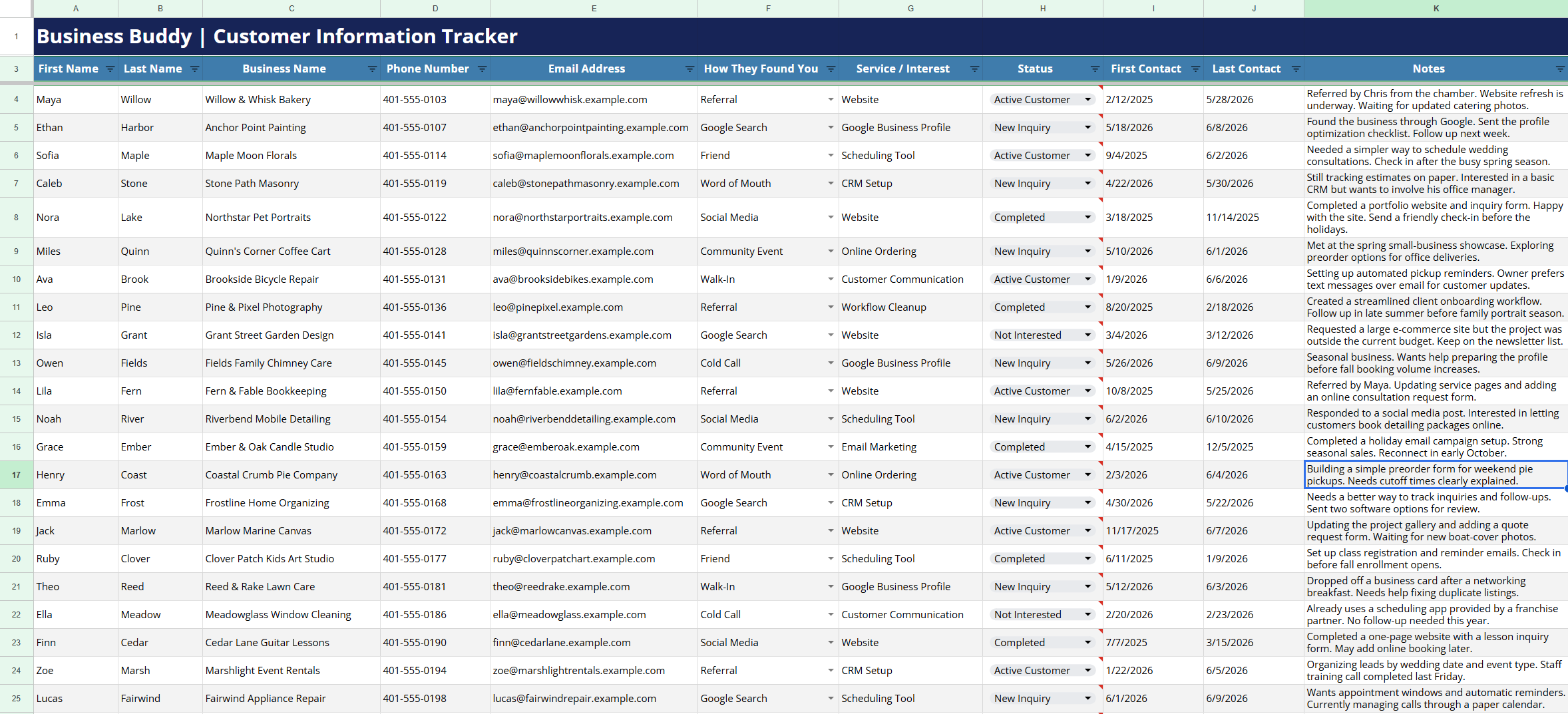
Eight fields cover most small businesses. More than that gets skipped during busy weeks, which defeats the purpose.
| Field | What it's for |
|---|---|
| First and last name | A real, findable identity |
| Phone number | One number, the one that gets answered |
| Quotes, invoices, written follow-ups | |
| How they found you | Reveals which marketing actually works |
| Service provided | The history of the relationship |
| First and last contact dates | How fresh the relationship is |
| Status | Where things stand right now |
| Notes | One or two lines of context |
The notes field is the difference between a list and a relationship tool, and it works only if it stays short. One line of context: how you know them, what they care about, anything that prevents the next conversation from starting at zero. A record reading "Referred by the Hendersons. Two rental properties on the east side. Prefers text." tells whoever opens it, including future you, everything needed to pick up the thread.
The free template
The free Customer Tracker template below has these fields pre-built in Google Sheets or Excel.
How do I move my existing data into one place?
The information already exists; it's just distributed. Consolidating it is a one-time project of a few hours, and it goes fastest in this order:
Start with your phone contacts.
They usually hold the most complete set of names and numbers. Export or copy the business-related entries into the tracker.
Sweep your sent email folder for the past year.
Anyone you sent a quote or invoice to belongs in the tracker. Sent mail beats the inbox because it filters for people you actually engaged.
Pull from your invoicing tool.
QuickBooks or whatever handles your billing has an exportable customer list with reliable spellings and addresses.
Fill in the gaps by memory, once.
This is the last time memory is the system. Names you know matter but can’t find anywhere get typed in with whatever you have.
How do I clean up duplicate contacts for free?
Duplicates make every future step worse, and both major platforms fix them at no cost.
Google: open contacts.google.com in a web browser (the tool isn't in the phone app), select "Merge and fix" in the left sidebar, and review the side-by-side duplicates it finds. Merge individually or all at once, and correct names to real ones while you're there.
Apple: on a Mac, open Contacts, choose Card, then "Look for Duplicates," and confirm the merges. On an iPhone alone, open a duplicate contact, tap Edit, scroll down, and use "Link Contacts." You can also manage contacts at icloud.com/contacts.
Budget about an hour. The end state is one entry per human being.
When is a spreadsheet enough, and when do I need a CRM?
A spreadsheet is enough when one or two people run the business, follow-ups are simple, and the active customer count sits around fifty or below. Plenty of businesses stay in that range for years, and a spreadsheet that gets opened daily outperforms a CRM that gets abandoned in week three. If follow-up is the part that worries you, the simple follow-up system video shows how a three-column tracker keeps leads from slipping.
A CRM earns its cost when specific symptoms appear: leads slipping despite the spreadsheet, several people needing live access to the same records, or follow-up needs that want built-in reminders and automation. Upgrade in response to symptoms, not in anticipation of them. An owner who has run a tracker for a year knows exactly which CRM features matter; an owner who starts with the CRM is guessing.
One more filter that outranks every feature comparison: whether you can tolerate using the tool. Software that irritates its owner stops getting opened, and at that point its capabilities are irrelevant.
At a glance
Spreadsheet vs. CRM: when each fits
A spreadsheet is enough when...
- One or two people run the business
- Follow-ups are simple and infrequent
- Active customer count is ~50 or below
- You want zero cost and full control
A CRM earns its cost when...
- Leads slip despite the spreadsheet
- Several people need live access
- You need built-in reminders and automation
- The business outgrows one person’s memory
Which tools are worth knowing?
Organized by need rather than popularity:
| If you need | Worth a look |
|---|---|
| A free CRM | HubSpot Free (contact database and pipeline), Zoho CRM free (up to 3 users) |
| Email automation | ActiveCampaign (sequences and triggers), MailChimp (newsletters) |
| Pipeline visibility for a team | Monday CRM, Pipedrive |
| Solo work with proposals and invoicing | Bonsai, which is what I run my own business on |
| Mostly appointment scheduling | Cal.com or Calendly rather than a CRM at all |
Two cautions.
- QuickBooks holds customer names because invoices live there, but it manages money, not relationships; keeping the two systems separate also means a helper handling customer communication never touches your financials.
- Salesforce is excellent enterprise software being regularly pitched to ten-person businesses it was not designed for; if that pitch reaches you, ask hard questions about cost and complexity first.
For my customers, the tools I have used most often are Monday CRM, ActiveCampaign, Bonsai, and plain spreadsheets.

Keep the next step somewhere you can check between jobs, then update it while the conversation is fresh.
Illustrative stock photography.What habits keep the system working?
Structure gets a system started; three habits keep it alive.
Update at the moment of contact
A record edited right after the call takes ten seconds. One edited "later" doesn’t happen.
Enforce one entry per person
A customer never exists in three conflicting versions across tracker, phone, and notes app.
Keep it reachable from your phone
A system that requires a desk gets bypassed the first busy afternoon.
Underneath all three sits an ownership principle: core business information belongs in something you control, in plain formats you can export and move, not locked inside a rented tool that can change its pricing or rules at will. A spreadsheet in your own account meets that bar completely. Graduate to a CRM when the symptoms say so, and take your clean data with you. If you want a broader check on your operations, the free self-assessment covers ten areas including customer records.
Free Resources
Set a time to talk
Grab the templates referenced in this guide and start organizing your customer data today.
Customer Tracker Template, Google Sheets
Pre-built with the eight fields from this guide. Copy to your Drive in one click.
Customer Tracker Template, Excel
The same tracker for Excel users.
Free Self-Assessment: Are Day-to-Day Operations Eating Up Your Time?
10 yes/no questions with specific fixes for each area. Includes printable PDF.
Good to know
Practical questions.
How many customers can a spreadsheet handle before it breaks down?
How long does consolidating my existing data take?
What's the most common mistake in customer records?
Should customer information live in QuickBooks?
What if I started a CRM before and abandoned it?
Is customer data safe in a Google Sheet?
Need help putting this into practice?
Bring the problem you want to solve. We can discuss what is getting in the way and whether hands-on help makes sense for your business.

Mike Uttley
I run Business Buddy in Smithfield, Rhode Island. I help owner-run businesses simplify systems, follow up with customers, and improve their online presence.