

How to Audit and Cut Unused Software Subscriptions
Written by Mike Uttley · Updated · 8 min read
Practical help for owner-run businesses. 18 years in financial technology. Zapier Solutions Partner.
businessbuddyri.com/resources/guides/how-to-audit-business-software-subscriptions/
Your small business is likely paying for software you do not use. The fix is to match every monthly charge against a real workflow step. Cancel any tool that does not save time or prevent a costly mistake. Keep only the software that performs one clear job and has an assigned user.
Key Takeaways
- Match every monthly software charge against a real workflow step -- cancel anything without an assigned user or clear job.
- Buying a tool does not fix a broken process. Build the sequence first, then choose software to support it.
- Ask four questions before keeping any tool: what job does it do, who uses it, is it a duplicate, and what breaks if I cancel.
- Export data and downgrade to free tiers before canceling to test safely without losing information.
- Review software expenses quarterly to catch new overlaps and forgotten subscriptions before they accumulate.

What is the difference between a tool and a system?
Many business owners confuse buying software with fixing a broken process. You can sign up for a customer relationship management (CRM) tool, but your leads will still sit in text messages and inbox folders if you do not change how you handle them daily. The software is just the container. The system is the sequence of steps you take every time a new lead arrives. The habit is repeating that sequence until it requires no conscious effort. Buying a tool gives you access to features. It does not give you a process or a routine.
When I review accounts for local clients, I often see the same pattern. Someone buys a platform hoping it will organize their business. They pay thirty dollars, fifty dollars, or a hundred dollars each month. The leads do not magically sort themselves. The tool sits empty while the underlying workflow stays broken. You cannot automate a habit you have not built yet. Build the sequence first. Document what happens when a lead comes in. Decide who follows up and how quickly. Put that sequence into whatever system you already use. Only then does the software become useful.
If you are trying to track customers without a repeatable process, start with a basic spreadsheet. The three-tab business tracker keeps contact details, project notes, and next steps in one place without forcing you into a monthly fee.
How do I find duplicate or forgotten subscriptions?
Almost every small business carries at least one subscription they stopped using months ago. The billing system hides these charges through autopay, small monthly amounts, and annual renewals that blur together. A twelve dollar monthly charge looks harmless on its own. Twelve times twelve is a hundred forty four dollars each year. Multiply that across five or six forgotten tools and the number climbs fast.
I once worked with a client who signed up for a second Microsoft Office suite after a retailer suggested it was required. She already had a comprehensive version tied to her main account. People do not notice these charges because they file them as occasional expenses rather than recurring obligations.
Cloud storage, email platforms, design tools, and video conferencing accounts overlap constantly. You pay for separate cloud spaces without realizing your primary account already includes ample storage. Phone plans bundle productivity apps that nobody activates. Before you approve any new purchase, verify whether an existing account handles the task.
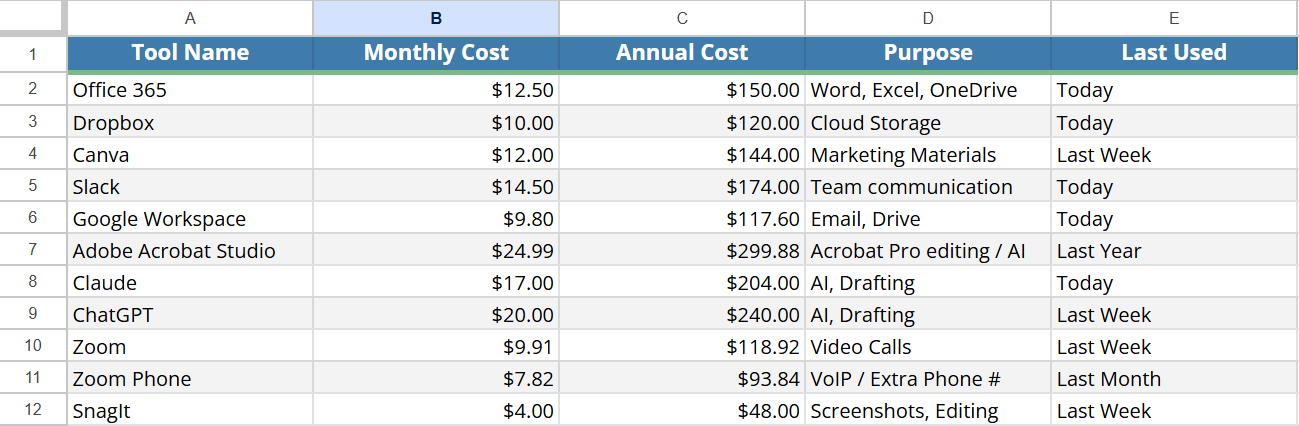
The only way to see the full picture is to list every charge on paper or in a blank spreadsheet. Create one row per tool. List the name, the monthly or annual cost, the intended purpose, and the last date someone actually opened it. The doubles and triples will stand out immediately. Cross out what nobody has touched since early spring. Those are your first cancellations.
Which four questions should I ask before keeping a tool?
Run every active software through four specific checks before you decide to keep it.
What is the actual job this does for me right now?
If you cannot name the task in one sentence, the tool has no place in your operation.
Who is actively using it?
Software that sits idle costs money and creates security gaps.
Do I already pay for something that covers this exact function?
Overlap happens when teams buy solutions without checking existing access levels.
What happens if I cancel today?
If the answer involves lost data, broken workflows, or compliance risks, pause the cancellation. Everything else is fair game.
Do not let worry keep dead subscriptions alive. Uncertainty about dependencies keeps people paying for tools that nobody needs. Test cancellations safely instead of guessing. Export all your contact lists and files first. Downgrade to a free tier if the provider offers one. Wait a month. If your business runs exactly as before, complete the cancellation.
Avoid deleting accounting software or tax filing tools until you verify compliance requirements with your bookkeeper. This audit targets the pile of business tools that slipped past your attention, not the infrastructure that keeps you compliant.
- Export
Save the files, contacts, and history you need.
- Check connections
Identify the work and tools that depend on it.
- Test the change
Check that the business still works before you cancel.
What is the safe way to cancel without breaking things?
Cancellation should be methodical, not impulsive. Start by listing every tool you plan to remove. Export all data from each account while you still have access. Some platforms make this easy. Others bury the export function under settings menus. Move files to a local folder before you pull the trigger.
Check what breaks when a service turns off. Document those dependencies. Downgrade to free tiers whenever possible to maintain access without paying. Give each system two to three weeks in free mode. Track whether missed notifications, lost contacts, or stalled projects actually appear. Write down what stays working and what falls apart. If nothing breaks and your team does not complain, finalize the cancellation.
After you cancel
- Remove billing information from the account if the provider still shows it on your statements.
- Clear your calendar of any recurring invites tied to the tool.
- Uninstall desktop applications to prevent accidental logins.
- Update shared passwords so former users cannot access remaining accounts.
This process takes about twenty minutes per tool but saves months of regret and repeated charges. Keep a running list of what you successfully removed. The savings will show up clearly on your next quarterly review.
How do I spot overlapping bundles and hidden AI costs?
Artificial intelligence subscriptions pile up quickly because providers market them as essential upgrades rather than optional extras. Pick the one or two tools that actually support your daily workflow. Drop the rest. Keep in mind that AI pricing changes often. Review these subscriptions every quarter rather than assuming they are permanent business expenses.
Look at standard bundles next. Microsoft accounts include cloud storage that replaces separate file hosting services. Amazon Prime Business memberships provide tools that can make another subscription redundant. Many phone carriers add free productivity apps to basic plans that go unused. Before approving any new software purchase, verify whether an existing account already handles the task.
You do not need Dropbox if you are satisfied with OneDrive. You do not need a separate CRM if your inbox labels track conversations adequately. Match your actual volume to your tool capacity. A business handling two deals a month does not need enterprise features. A smaller plan with fewer bells and whistles often costs less and fails less often because the interface matches your daily rhythm.
Which tools actually earn their monthly fee?
Not every software purchase deserves the axe. Some tools earn their keep by saving hours or stopping costly errors. The test for keeping a tool is straightforward: does it save you real time or prevent an expensive mistake?
Effective tools usually focus on a single function. They send reminders before deadlines drop off the calendar. They let clients book appointments without phone tag. They route follow ups automatically so leads stay warm. They centralize client details instead of scattering them across five different programs.
A booking platform that fills two or three missed appointments each week pays for itself within days. A simple email sequence that captures quote requests before they vanish into spam folders justifies its own cost. Simple often beats expensive. Platforms with fifty features usually require training, setup time, and ongoing management that drains your limited resources. I would rather use a thirty dollar tool that saves five hours each week than a two hundred dollar system with half those features buried in menus nobody touches.
If you hate using a tool, it will fail. You can see the drop off rates climb as soon as daily friction enters the workflow. Keep what works. Cancel what drains energy and cash without returning value. For more on which AI tools actually deserve a spot, see the guide on AI tools for small businesses.
What maintenance habits keep software costs under control?
A one time audit only solves half the problem. The other half is establishing a routine that stops new charges from accumulating. Review your bank statements for software charges every quarter. Match each line item to an active workflow. Remove anything that falls out of favor or gets replaced by another system.
Ask your team which tools they actually open daily. People often keep access to platforms they tried once and never returned to. Audit user seats before renewing team licenses. Downgrade unused licenses before the renewal date hits rather than paying full price for ghost accounts.
Document your approved software list in a shared location so new hires know what exists. Set calendar reminders thirty days before major renewals. Use that window to test alternatives, export data, and cancel if necessary. Track annual expenses as monthly averages when evaluating impact on cash flow. A hundred forty four dollar charge feels large until you break it down to twelve dollars a month. That number is easier to justify against real business value.
Stay alert for marketing prompts that suggest adding another subscription. Most of those emails target growth metrics that do not match your current stage. Wait before clicking. Measure first. Act later.
Free Resources
Set a time to talk
Track your customers and audit your subscriptions with these free templates.
Free Customer Tracker Template (Google Sheets)
A ready-to-use spreadsheet for tracking customers, follow-ups, and project details.
Free Customer Tracker Template (Excel)
The same tracker in Excel format for offline use and local storage.
Three-Tab Business Tracker Workbook for Subscription Audits
Centralize customers, business vitals, and equipment in one workbook. Use it to audit and track every tool your business pays for.
Good to know
Practical questions.
How do I find subscriptions I forgot about?
Can I cancel a software subscription in the middle of a billing cycle?
How often should I audit business software costs?
What if canceling a tool breaks my workflow?
Do I need separate tools for email, scheduling, and customer tracking?
Need help putting this into practice?
Bring the problem you want to solve. We can discuss what is getting in the way and whether hands-on help makes sense for your business.

Mike Uttley
I run Business Buddy in Smithfield, Rhode Island. I help owner-run businesses simplify systems, follow up with customers, and improve their online presence.